Customer Cards
Each customer can have any number of customer cards, for example one per vehicle or driver. The customer refuels at your stations with the card. For each card you define what may be purchased and which limits apply.
A customer's card list
Open Management → Customers and click the card icon of the customer. The Customer Cards page lists all cards of this customer.
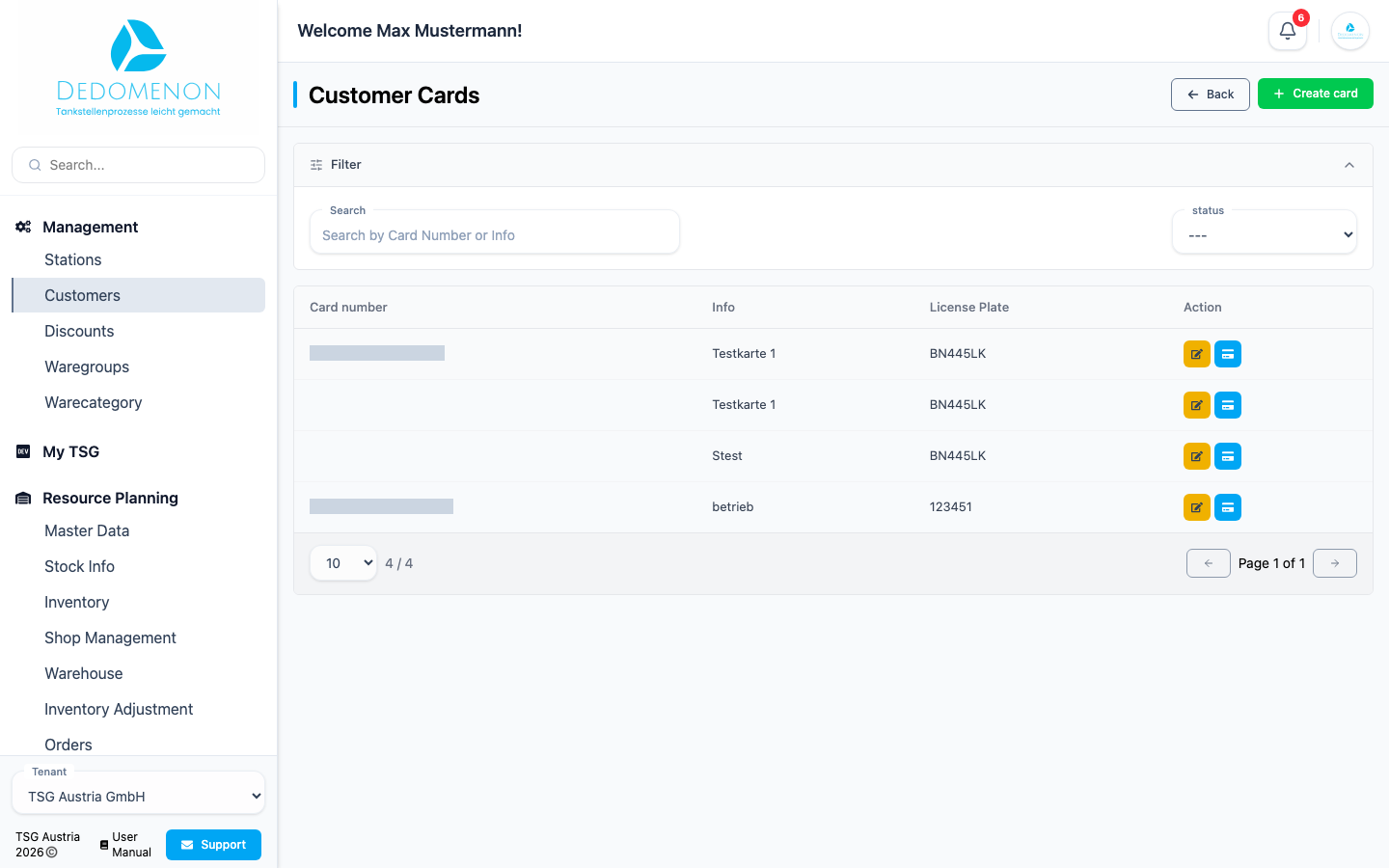
- Search: finds cards by card number or info (name).
- Status: shows only active (Active) or only blocked (Blocked) cards.
The table shows the Card number, Info and License Plate. The Action column offers:
- Pencil icon: edit the card
- Card icon: transfer the card to another customer
Creating a card
- Click Create card.
- Under Info(Name), enter a description, such as the driver's name.
- Enter the vehicle's license plate.
- Click the green save icon.
Dedomenon creates the card and opens the Edit card page, where you finish configuring it.
Editing a card
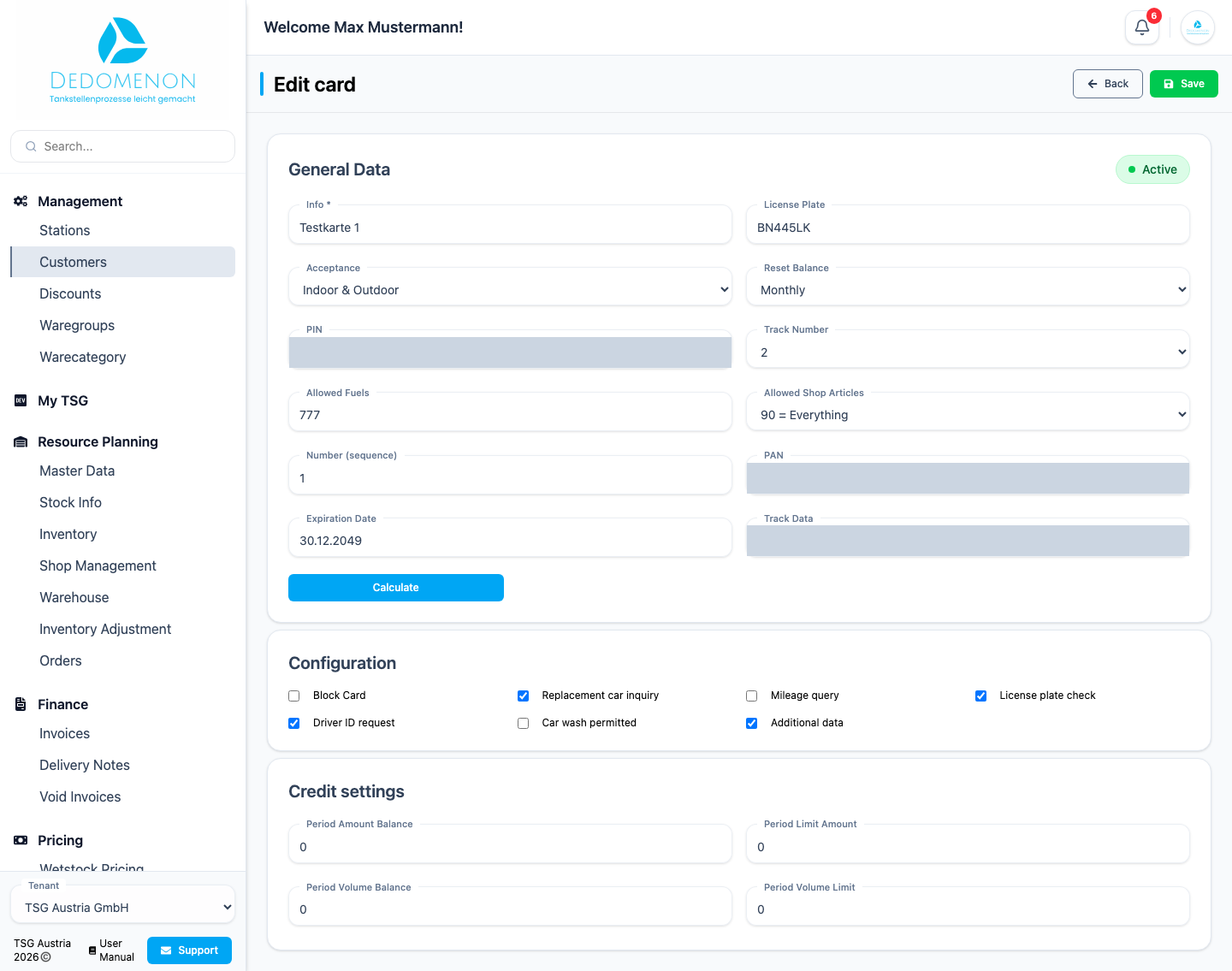
Save your changes with Save in the top right corner. Dedomenon then sends the card to all of the customer's stations and shows the progress in the Transferring changes to stations dialog.
General Data
A status at the top shows whether the card is Active or Blocked.
| Field | Meaning |
|---|---|
| Info, License Plate | Description and license plate of the card |
| Acceptance | Where the card is accepted |
| Reset Balance | How often the card balance is reset |
| PIN | PIN that must be entered when refuelling |
| Allowed Fuels | Which fuels may be purchased with the card |
| Allowed Shop Articles | Which shop articles may be purchased with the card |
| Track Number, Number (sequence), Expiration Date, Track Data | Technical card data |
| PAN | The card number. Calculate generates the PAN from the card data |
Configuration
| Option | Effect |
|---|---|
| Block Card | Blocks the card, e.g. if it is lost. It is declined at the stations |
| Replacement car inquiry | Asks at the POS whether a replacement vehicle is being refuelled |
| Mileage query | Asks for the odometer reading when refuelling |
| License plate check | Asks for the license plate when refuelling |
| Driver ID request | Asks for a driver ID when refuelling |
| Car wash permitted | Allows paying for a car wash with the card |
| Additional data | Asks for additional data when refuelling |
Credit settings
Limit how much may be purchased with the card per period:
| Field | Meaning |
|---|---|
| Period Limit Amount | Maximum amount per period |
| Period Amount Balance | Amount already used in the current period |
| Period Volume Limit | Maximum volume (litres) per period |
| Period Volume Balance | Volume already refuelled in the current period |
The length of the period is set with Reset Balance.
Transferring a card to another customer
If a vehicle or driver moves to another customer, transfer the card instead of issuing a new one.
- In the card list, click the card icon of the card.
- The Transfer customer card dialog shows the current customer under Selected Customer.
- Under New customer, select the customer the card should move to.
- Click Save.
Dedomenon sends the change to the stations. If the transfer fails, the card is automatically assigned back to the previous customer and you receive a message.